 how-to
How to Sell Electronics Online Safely
Table of Contents
- Choose a Secure Marketplace for Selling Electronics
- How to Wipe Data from Electronics Before Selling
- Document Your Item's Condition with Photos and Descriptions
- Price Your Electronics Competitively
- How to Avoid Online Selling Scams
- How to Package Electronics for Shipping
- Protect Yourself During Payment and Handover
- Frequently Asked Questions
Last Updated: September 28, 2026
Choose a Secure Marketplace for Selling Electronics
To sell electronics online safely, begin by choosing a secure marketplace. Not all platforms offer equal protection, and this choice directly impacts your risk.
Choose a peer-to-peer marketplace with built-in buyer protection that holds payment in escrow until the buyer confirms receipt.
LOSBID is a community marketplace where you can list items free and choose between "Buy Now" or live auctions. The platform holds payment securely in escrow, so you're not exchanging money directly with strangers.
When choosing any marketplace, check these features:
- Payment held in escrow until delivery confirmed
- Seller protection policies that cover disputes
- Buyer verification to reduce scams
- Clear fee structure so you know what you'll keep
- Option to track shipments and proof of postage
Understand your marketplace's fee structure; some charge a percentage of sale price, others a listing fee, so you can price competitively and calculate actual profit.
How to Wipe Data from Electronics Before Selling
Before a single photo goes online, remove all your personal data. This is non-negotiable when you sell electronics online safely.
Your phone, tablet, or laptop contains passwords, banking details, photos, and messages. A factory reset removes this data, but doing it properly matters; partial deletions leave recoverable traces.
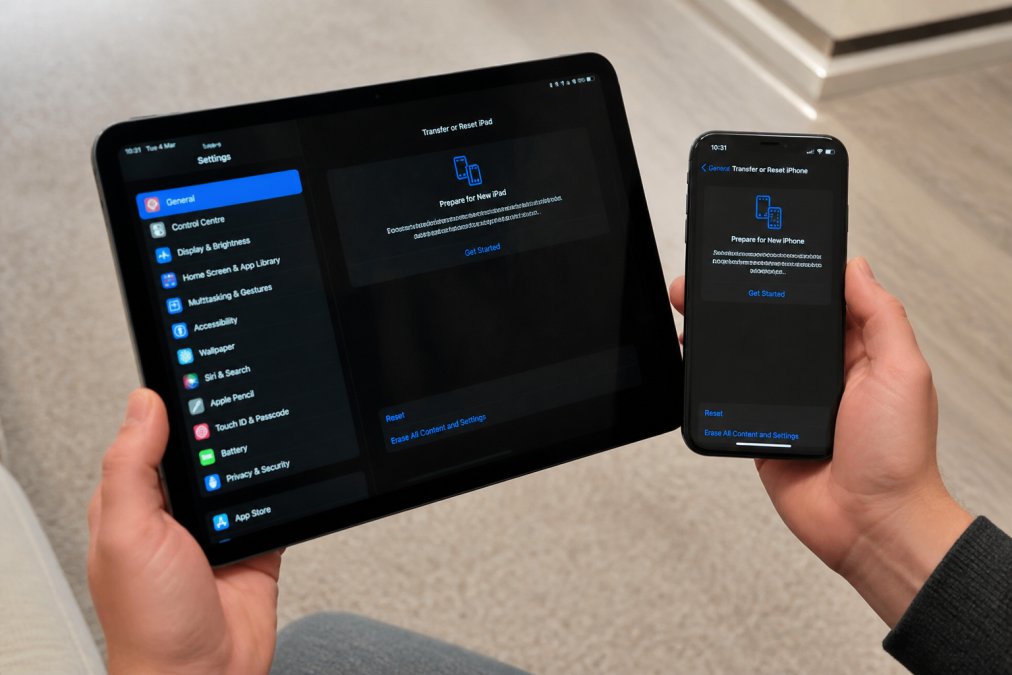
For smartphones and tablets, use the device's built-in reset function:
- Back up anything you want to keep (photos, contacts) to cloud storage first
- Go to Settings and find "Reset" or "Erase All Content"
- Choose the option that wipes data completely, not just a quick reset
- Wait for the process to finish completely before powering off
For laptops and computers, the process varies by operating system. Windows devices have a "Reset this PC" option. Mac computers use "Erase and Reinstall." Both options let you choose whether to keep personal files or remove everything.
After factory reset, sign out cloud accounts (email, iCloud, Google Account) separately by removing the device from trusted devices or linked accounts.
Modern devices use encryption that makes recovery extremely difficult without the original password. For older electronics, use data-wiping software designed for your device type to overwrite storage multiple times.
Document that you've completed a factory reset. Keep a note or screenshot showing the device's "About" page after reset. This proof reassures buyers that their data won't be compromised.
Document Your Item's Condition with Photos and Descriptions
Buyers can't touch your electronics before purchase. Clear photos and honest descriptions prevent disputes and build trust.
Take photos in natural light showing the front, back, sides, and screen. Include close-ups of any scratches, dents, cracks, or wear from multiple angles.
Your listing description should match the photos. Be specific about condition. Use grading terms consistently:
- Like new: no visible damage, works perfectly, original packaging included
- Excellent: minimal signs of use, all functions work, minor cosmetic wear only
- Good: visible signs of use, all functions work, scratches or minor dents present
- Fair: significant wear, all functions work, notable scratches or cosmetic damage
Include technical details: for smartphones, storage capacity and battery health; for laptops, processor, RAM, storage type, and any missing hardware.
Describe what's included (original box, cables, accessories) or state upfront if items are missing.
Avoid vague language. "Good condition" means nothing. "Excellent condition with light scratches on the back and a fully functional screen" tells buyers exactly what to expect.
Price Your Electronics Competitively
Price competitively by accounting for marketplace fees, payment processing, and shipping costs that eat into profit.
Research Comparable Listings
Research comparable devices on your marketplace, filtering by condition, storage, and age. Note asking prices and which items sell quickly.
Check sold listings, not just active ones; actual sale prices often differ from asking prices, especially on auction platforms.
Pre-owned electronics depreciate predictably: smartphones lose 15-20% annually, laptops 10-15%. A flagship phone in excellent condition may retain 60% of original value; an older budget model might fetch only 35%.
Factor in the condition grading you chose. A two-year-old phone in excellent condition might sell for 60% of its original price. The same phone in fair condition might only fetch 40%. Be honest about your grading; buyers can tell when a listing oversells condition, and you'll face disputes or returns.
Calculate Your Net Profit After All Costs
Most sellers forget to subtract marketplace fees, payment processing fees, and shipping costs from their asking price.
Marketplace fees range from 5-15% commission plus listing fees. Payment processing adds 2-3%. Shipping costs £5-£15 depending on service; insurance adds 1-2% for high-value items.
Here's a worked example:
Selling a smartphone worth £400 on a marketplace with 10% commission:
- Asking price: £400
- Marketplace commission (10%): -£40
- Payment processing fee (2.5%): -£10
- Shipping cost (Royal Mail Special Delivery): -£12
- Net profit: £338
You've lost £62 (15.5%) to fees and shipping. If you'd priced at £350 instead, your net would be only £271, a significant difference.
To find your target asking price, work backwards from your desired profit:
- Decide what you want to keep (e.g., £350)
- Add back marketplace commission: £350 ÷ 0.90 = £389
- Add back payment processing: £389 ÷ 0.975 = £399
- Add shipping cost: £399 + £12 = £411
Your asking price should be around £411 to net £350 after all costs.
Adjust for Marketplace Type and Demand
Auction-based platforms like LOSBID let you start at a lower reserve price and let buyer competition drive the final price. This can work well for popular electronics where demand is strong. For niche items or slower-moving categories, a fixed "Buy Now" price prevents the risk of underselling.
On auction platforms, start your reserve at 70-80% of target asking price to avoid underselling if bidding is weak.
On fixed-price platforms, monitor performance: no offers after 3-5 days suggests overpricing; immediate sales suggest underpricing. Adjust accordingly.
Factor in Seasonal Demand
Electronics pricing fluctuates seasonally: phones drop 10-15% after new model launches; laptops peak in August and January; consoles peak in November-December. Plan timing accordingly.
Use Marketplace Tools and Comparisons
Use marketplace pricing tools to validate research. Average the last 5-10 sales of comparable items to get realistic market price and smooth out outliers.
How to Avoid Online Selling Scams
Scammers target electronics sellers for high-value items. Understanding common tactics, legal protections, and tax obligations strengthens your position.
Common Scams and How to Counter Them
A common scam is the chargeback. A buyer purchases your item, you ship it, they receive it, then they claim to their bank that they never received it. The bank reverses the payment. You're left without the item and without the money.
Protect yourself by using tracked shipping with signature confirmation. This creates proof of delivery. Keep the tracking number and proof of postage. If a chargeback occurs, you can show the buyer signed for the package. Royal Mail Special Delivery and courier services like DPD both provide this level of tracking.
Scammers send fake payment confirmations. Only accept payment through the marketplace's official system where money goes into escrow. Never accept payment outside the platform.
Never ship before payment clears. Wait for marketplace confirmation that funds are secured; this is standard practice.
Red flags include requests to ship immediately or use alternative payment methods. Scammers create urgency or ask for workarounds. Trust your instincts.
Understanding Your Seller Protection Rights
Save all communications, photos, and receipts for 12 months.
For chargebacks, proof of delivery and signature confirmation are your strongest defence. Without them, chargebacks almost always succeed.
Check your marketplace's seller protection terms. LOSBID holds payment in escrow until buyer confirms receipt, reducing chargeback risk.
Tax Implications for Electronics Sales
Selling personal electronics can trigger tax obligations. The "personal use exemption" applies to one-off sales, but regular or large-quantity sales may classify you as running a business.
If you sell more than 4-5 high-value items annually or buy to resell, you're likely trading and must register for VAT (if turnover exceeds £85,000), report income, and keep records. One-off sales of personal items incur no tax.
Handling Disputes Before They Escalate
Not every disagreement is a scam. Sometimes a buyer genuinely believes the item doesn't match the listing. How you respond determines whether the dispute resolves or escalates to a chargeback.
How to Package Electronics for Shipping
Proper packaging prevents damaged items, disputes, and chargebacks. Buyers expect items to arrive in the condition shown in your photos.
Protect Yourself During Payment and Handover
The moment payment transfers is when most disputes happen. Protecting yourself here matters enormously.
Frequently Asked Questions
What should I do to my device before selling electronics online?
Before selling, perform a factory reset to remove all personal data, delete cloud accounts (Apple ID, Google Account), and check the serial number and IMEI number for authenticity. Wipe all photos, messages, and payment information. Test that the device powers on and basic functions work. Clean the exterior and document the condition with clear photos. This protects your privacy and builds buyer confidence in your listing.
How do I avoid scams when selling electronics online?
Use a marketplace with buyer verification and payment protection policies. Never accept payment outside the platform. Request proof of postage when shipping and keep tracking numbers. Be cautious of buyers who pressure you to sell outside the platform or offer unusually high prices. Verify payment has cleared before handing over the item. Report suspicious behaviour to the platform immediately. Trust your instincts if something feels wrong about an interaction.
How can I ensure I get paid safely for my electronics?
Sell through a platform offering escrow or payment protection, where funds are held until the buyer confirms receipt. Use tracked shipping with proof of postage so you have evidence of delivery. Take photos of the item before packing and include them in your listing. For local sales, use a safe exchange zone or public meeting place. Never release the item until payment has fully cleared in your account, not just pending.
Are there specific UK regulations for selling second-hand electronics?
Yes. Second-hand electronics must be as described and of satisfactory quality. For high-value electronics, keep records of the sale. Items containing hazardous materials may fall under waste regulations if not properly handled. Always declare the condition honestly to avoid legal disputes.
Selling electronics online safely requires attention at every step. Choosing a secure marketplace like LOSBID, wiping data properly, documenting condition honestly, and using tracked shipping with payment protection creates a safe transaction for both you and the buyer. The small effort upfront prevents costly disputes and chargebacks later. Start with these practices, and you'll build a track record of successful sales that attracts more buyers and higher prices over time.